
Book Management
Hawksoft Integration
Dynamic, data-driven insights into the metrics that matter for agents that use Hawksoft.

Hawksoft Integration Guide
Integrate your AMS for a free book of business valuation.
We're thrilled to announce that Milly Books now offers a direct integration with Hawksoft, enhancing your workflow by seamlessly merging your policy data with the Milly Books platform. This feature is currently in Beta with select users. With this integration, you gain the power to:
- Effortlessly Import Policy Data: Say goodbye to manual data entry. Milly Books empowers you to seamlessly import your policy data directly into our platform from your AMS.
- Custom Organization: Whether by Carrier, Line of Business, States, or any other combination, Milly Books' flexible system lets you organize policies into customizable "Slices" that can be used throughout the platform.
- Value Your Book: Using Milly Books’ proprietary valuation tool, gain deeper insights into your business by valuing your entire book or partial slices of your book effortlessly.
- Streamline Marketplace Listings: Easily list all or parts of your book to the marketplace.
Data Privacy Assurance
At Milly Books, we prioritize your data privacy. Rest assured, Milly Books never ingests customer data such as business names, customer names, or contact information of your clients.
Data points pulled into Milly Books include: Carrier, Line of Business, Total Premium
Insured State, Policy Type, Policy Number, Insured Zip Code, Client ID (eg: 123), Policy Status, NAIC Code, Num Claims, Num Terms, Payment Plan
Integration Guide
1. Opt In within Hawksoft
The first step in enabling the integration between Hawksoft and Milly Books starts on the Hawksoft platform. Follow the steps below to access Certificial from the Hawksoft marketplace and enable the integration.
- Access your Hawksoft account.
- Click the Setup Menu (gear icon) at the top right corner.
- Choose 'Marketplace'.
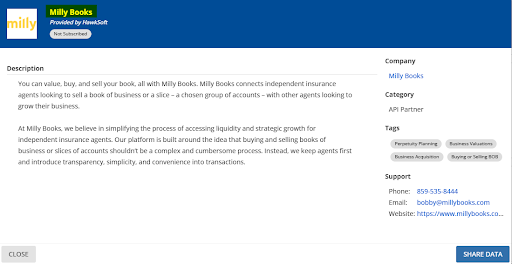
- Locate the Milly Books listing: Milly Books: Enables data sharing from Hawksoft to Milly Books.
- Check the boxes beside the listing to agree to their Terms and Conditions.
- Click 'Share Data'.
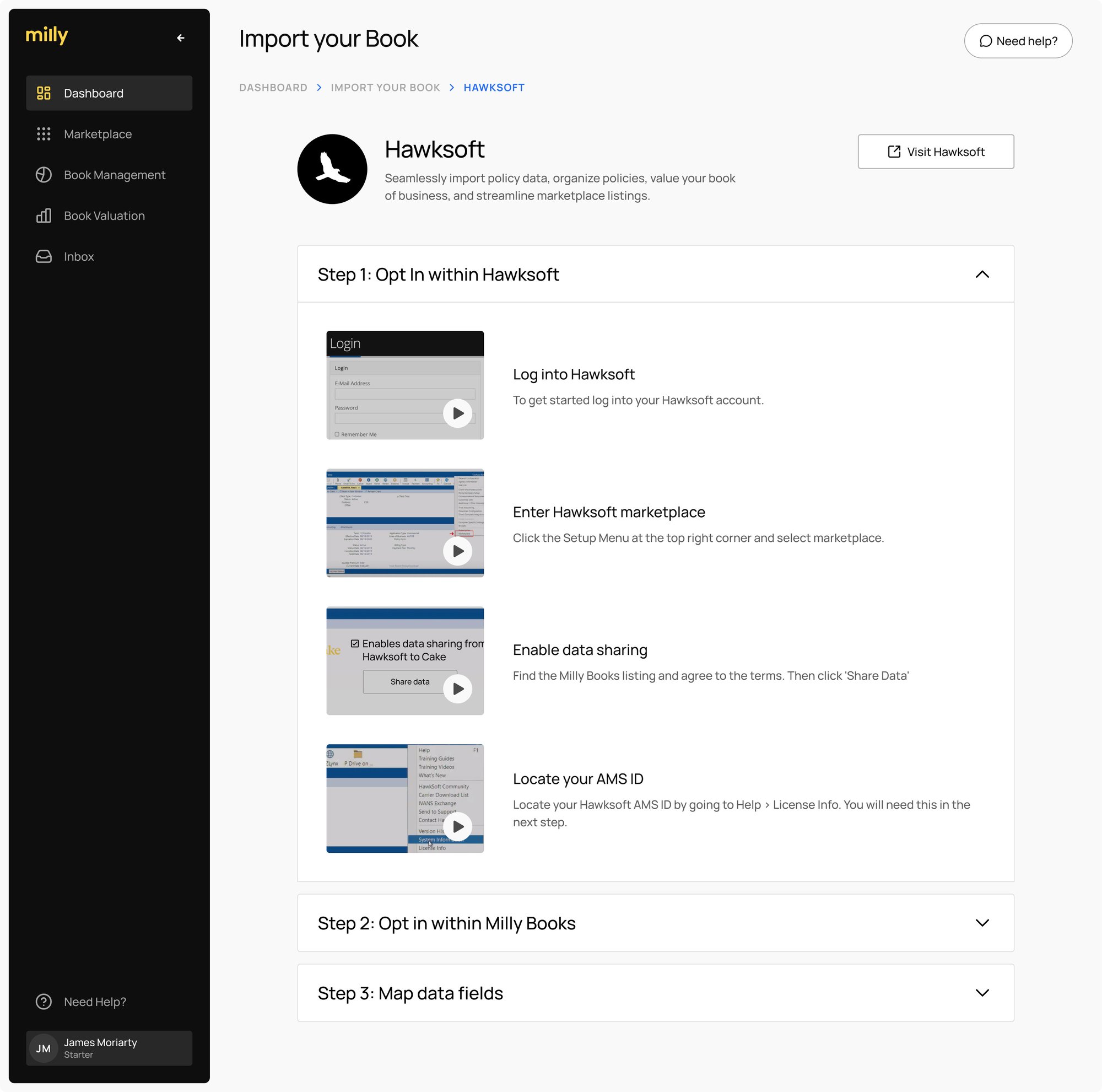
Locate your Hawksoft AMS ID
You will need your Hawksoft AMS ID (Contract ID number) to enable the integration on Milly Books.
You can locate this information within Hawksoft either on the Login page or by navigating to the Setup Menu and selecting "License Info."
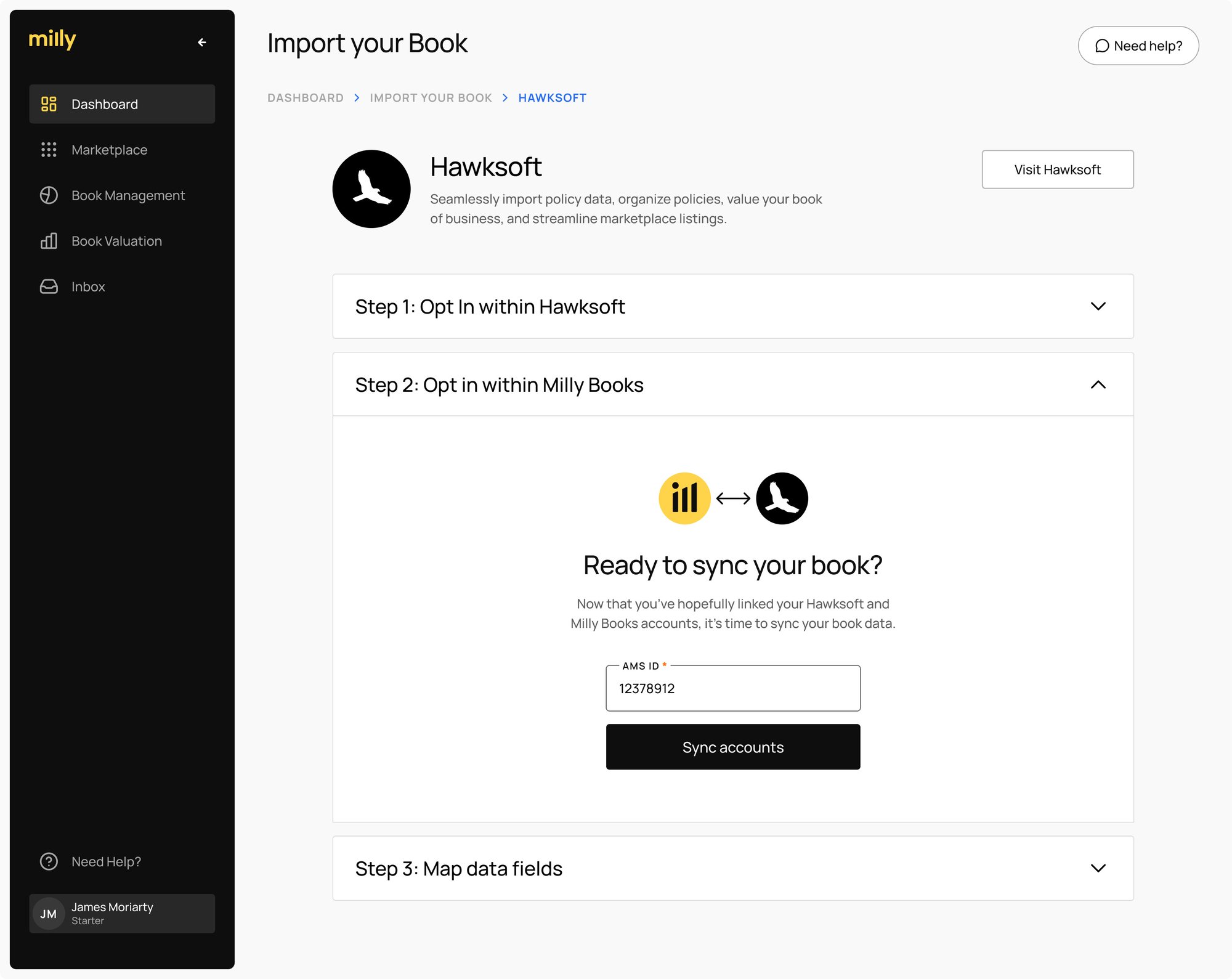
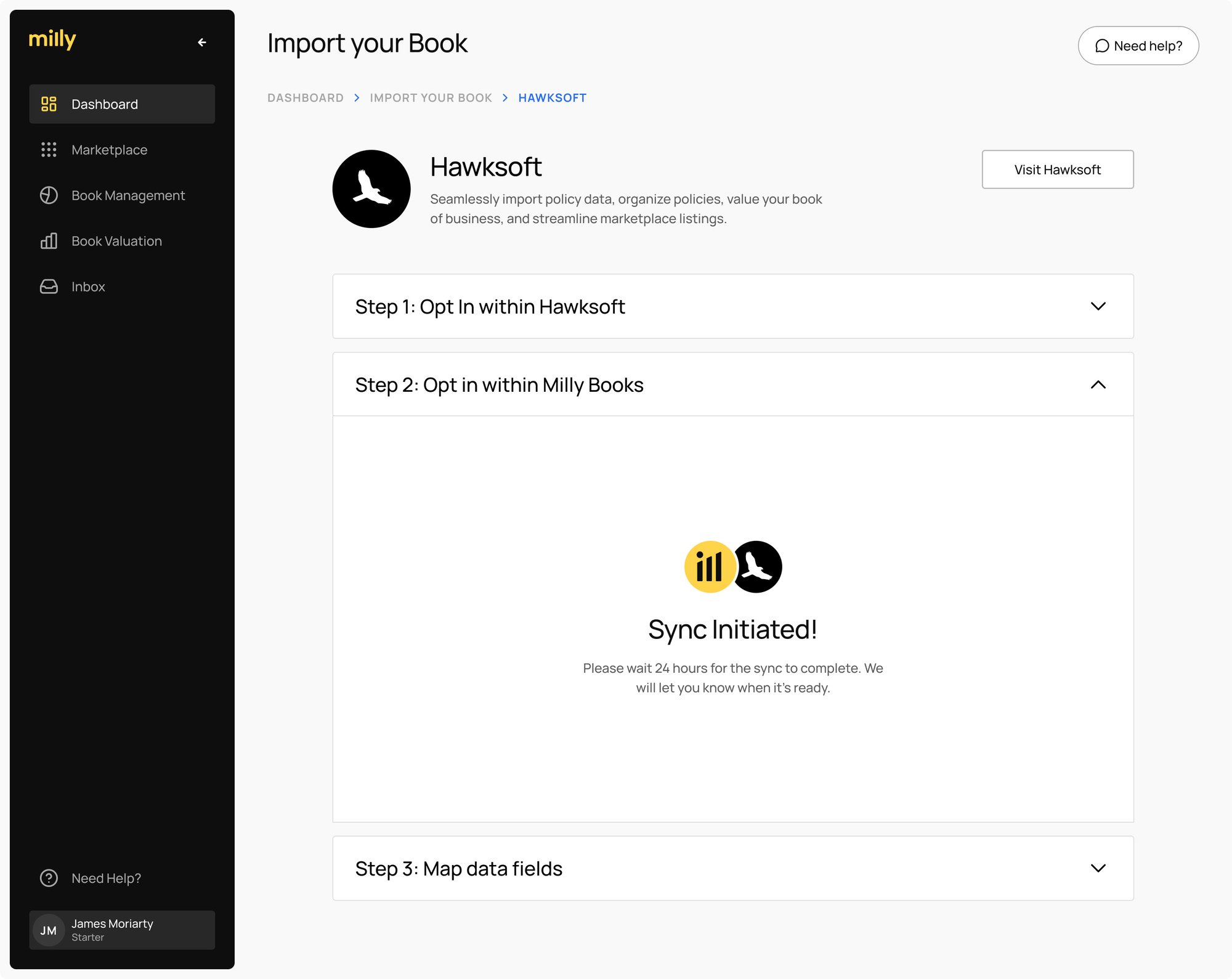
2. Opt In within Milly Books
Next step in completing the handshake between Milly Books and Hawksoft is enabling the integration within the Milly Books platform through one of the following options:
- Navigate to https://app.millybooks.com/book-management.
- Click on “Connect my AMS” and follow the wizard.
- Click connect/import and follow the onscreen instructions.
3. Sync Your Data
Once you've completed steps 1 and 2, your data will then integrate into the Milly Books platform within 24 hours. You'll receive an email notification once this integration process is complete.
After sync, you can conveniently view your policies at: https://app.millybooks.com/book-management. Policies are synced weekly and ensures that:
- New policies are automatically added.
- Any changes to existing policies are updated based on policy numbers.
- Navigate to https://app.millybooks.com/account#integrations.
- Correct the AMS ID field in the UI and click “Save”
4. Field Mapping
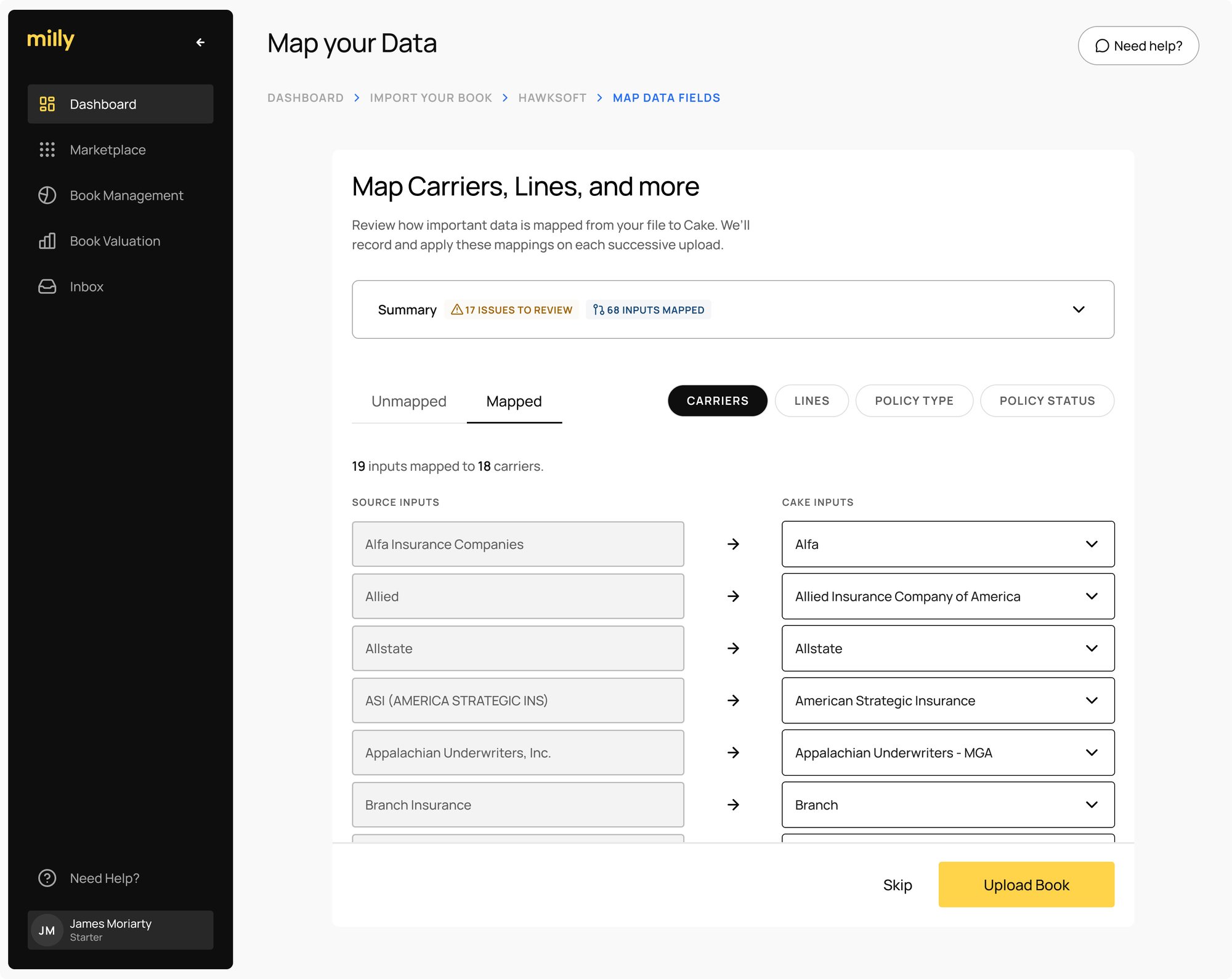
Milly Books does our best to map values from Hawksoft to Milly Books, such as Line of Business and Carriers. Mapping these values is recommended to produce the best possible experience within the platform, for instance ensuring that Book Valuation provides the most accurate estimate possible.
There may be instances where the system encounters difficulty in finding a direct match. In such scenarios, you'll be required to resolve any arising conflicts to maintain data integrity and maximize the efficacy of the integration.
- To view mapped values you can:
Navigate to https://app.millybooks.com/account#integrations - Click “... → Manage Mapping”
- You’ll see any issues shown at the top. These default to an “Other” selection in order to work within the platform.
- It is recommended to click into each input and find the best possible match, and use “Other” if no correct value is available.
5. Working with My Book
Once your book of business has been synced and mapping complete, you’re now ready to value and work with your book within the platform. Visit /book-management.
If you hit a snag or have any questions, please contact bobby@millybooks.com
Milly Books Pt. 1
The Insurance Perspectives Podcast
In this episode, Kenny Hendricks interviews Adam Bowe from Milly Books (previously Cake) on how agencies can utilize Milly Books' book of business marketplace to strategically grow their agency. The conversation covers the origins of Milly Books and Cake, the challenges in the insurance industry, and the unique value proposition of their platform.
Milly Books Pt. 2
The Insurance Perspectives Podcast
In this episode, Kenny Hendricks interviews Clayton Yomtob about how his agency uses Milly Books. The conversation covers topics such as the experience of using Milly Books' Marketplace, the impact on the Insurance Company Advisors Group, and the value it brings to the agency.